



Everyone is talking about AI, but most people are still using it like a party trick, asking it to write a poem, then going back to their old workflow. Meanwhile, a quieter group has wired AI into their actual work and is reclaiming five, six, eight hours a week. The difference is not intelligence; it is knowing which tools to use and where they genuinely save time.
This guide skips the hype and names the AI productivity tools that actually save you hours in 2026, what each one does, and how to fit it into a real workflow. No fluff, no “10x your life” promises, just the tools worth your time and how to use them so they pay you back.
What Makes an AI Tool Actually Save Time
Most AI tools are impressive in a demo and useless in practice. The ones that genuinely save time share three traits: they slot into work you already do, they remove a repetitive task rather than adding a new one, and they need little babysitting to get a good result.
Judge every tool by one question: does this give me back time I would otherwise spend? If a tool is fun but you have to check and redo its output constantly, it is a time sink. Everything below earns its place by clearing real work off your plate.
The Best AI Productivity Tools in 2026
1. ChatGPT and Claude — Your All-Purpose Assistants

The foundation of any AI workflow is a great general assistant. ChatGPT and Claude draft emails, summarize long documents, brainstorm, rewrite, plan, and answer questions in seconds. The trick is to stop treating them as novelties and start delegating real tasks: “summarize these notes into three action items,” “rewrite this email to sound warmer,” “outline this report.” Used daily, one of these alone saves hours.
2. Notion AI — Notes and Docs That Do the Work

Notion AI lives inside your workspace and turns messy notes into something useful. It summarizes meeting notes, pulls action items out of long documents, brainstorms, translates, and fixes grammar without you ever leaving the page. If your work already lives in Notion, its AI removes the busywork of tidying and extracting information.
3. Motion — AI That Builds Your Schedule

Motion takes your tasks and calendar and automatically decides when you will do each thing, blocking focus time and rescheduling when meetings move. It quietly kills the daily “what should I work on next?” question, which is one of the biggest hidden time-drains of a busy day. For anyone juggling many tasks and meetings, it is a genuine game-changer.
4. Reclaim — Defends Your Focus Time

Reclaim works alongside your calendar to protect time for your priorities, habits, and breaks, automatically finding and defending slots for deep work. When a meeting lands on your focus block, it intelligently moves things around so your important work does not get steamrolled. It is the tool that makes a good calendar actually hold.
5. Otter.ai — Never Take Meeting Notes Again

Otter.ai records and transcribes your meetings in real time, then summarizes them and pulls out action items. That means you can actually pay attention in a meeting instead of scrambling to type, and still walk away with a clean record and next steps. For anyone in back-to-back calls, it removes an entire category of work.
6. Grammarly — A Writing Layer Everywhere You Type
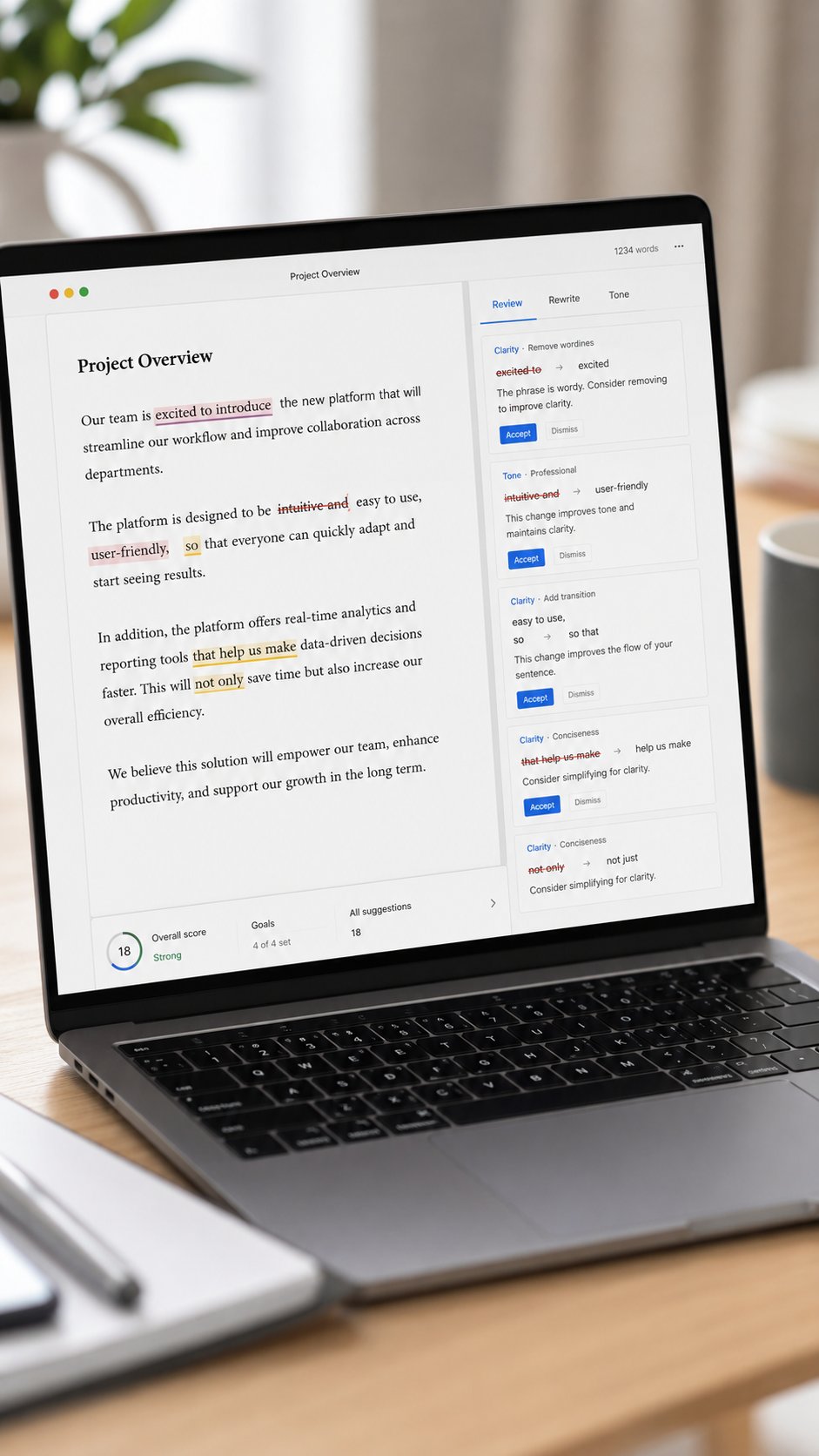
Grammarly has grown from a spell-checker into a full writing assistant that follows you across every app. Beyond catching errors, its tone and clarity suggestions help you write faster and avoid emails that land the wrong way. The time savings are small per message but enormous over a week of constant writing.
7. Zapier — Automate the Repetitive Stuff

Zapier connects your apps so that when something happens in one, it triggers an action in another, with no code required. Its AI Copilot now helps you build those automations in plain English. Automating even a few repetitive workflows, like saving attachments, logging leads, or posting updates, quietly removes tasks you do not even notice adding up.
8. An AI Meeting Notetaker (Fireflies or Fathom)

If your day is meetings, a dedicated AI notetaker like Fireflies or Fathom joins your calls, records, transcribes, and produces a searchable summary with action items. It overlaps with Otter but often integrates more tightly with video calls and CRMs. Pick one, let it attend every meeting, and stop writing recaps by hand.
How to Actually Save Hours (Not Just Collect Tools)
The mistake most people make is downloading ten tools and using none. Time savings come from integration, not collection. Start with one tool that targets your single biggest time-drain, whether that is writing, scheduling, or meetings, and use it until it is a habit before adding another.
Then build a simple routine around it. Pairing AI tools with a deliberate way of working multiplies the benefit, and our guide to the time-blocking system busy founders swear by shows how to protect the hours these tools give back so they turn into real, focused output instead of just more free time you fill with busywork.
Build Your AI Productivity Stack
You do not need all eight tools. A powerful, lean stack for most professionals looks like this: one general assistant (ChatGPT or Claude) for writing and thinking, one meeting tool (Otter or a notetaker) so you never take notes again, and one scheduling tool (Motion or Reclaim) to run your calendar. Add Grammarly if you write constantly and Zapier if you have repetitive app workflows.
That combination covers the three biggest time sinks, writing, meetings, and scheduling, without overwhelming you. Build it one tool at a time, and each addition should visibly hand you back time before you layer on the next.
Mistakes to Avoid
Do not adopt tools faster than you can build habits, since an unused subscription saves zero hours. Do not trust AI output blindly, always skim what it produces, especially for anything client-facing or factual. Do not automate a broken process, fix the workflow first, then let AI speed it up. And do not pay for premium tiers until a free version has proven the tool actually fits your work.
The Right Tools for Your Kind of Work
The best stack depends on where your hours actually go. Match the tools to your role rather than chasing every shiny app.
If you write a lot
Marketers, writers, and communicators get the most from ChatGPT or Claude for drafting and Grammarly for polishing. Together they cut first-draft time dramatically while keeping your voice and catching mistakes before they go out.
If your day is meetings
Managers and client-facing roles should prioritize an AI notetaker like Otter or Fireflies plus a scheduling tool like Motion or Reclaim. That combination removes note-taking and calendar Tetris, the two things that eat a meeting-heavy day alive.
If you run a business
Founders and solopreneurs benefit most from a general assistant plus Zapier to automate the repetitive operational tasks that pile up. Offloading admin to automations frees you to spend your hours on the work only you can do.
A Day With and Without AI
Picture two versions of the same busy Tuesday. In the old version, you spend the morning writing emails from scratch, take frantic notes in three meetings, manually reschedule your afternoon when a call runs long, and end the day with a pile of follow-ups you have not written yet.
In the AI version, you draft those emails in half the time with an assistant, let a notetaker capture every meeting and hand you the action items, let your scheduling tool quietly reshuffle the afternoon, and have your follow-ups half-written before you sit down. Nothing dramatic happened, you just removed the friction from a dozen small tasks, and that is where the hours come from. Multiplied across a week, that friction is the difference between drowning and having room to think.
The Skill That Beats Any Tool
Here is the part the tool reviews skip: the tools matter far less than your ability to delegate to them clearly. The people getting eight hours a week back are not using secret apps; they have learned to give AI good instructions and to hand off the right tasks.
That means being specific (“summarize this into five bullet points for a client” beats “summarize this”), giving context, and knowing which work to keep and which to offload. Treat AI like a fast, capable assistant who needs clear direction, and every tool on this list gets dramatically more useful. This skill, not any single app, is the real productivity unlock of 2026, and it costs nothing but practice to build.
How to Roll AI Into Your Week
Adopting AI works best as a gradual habit, not a weekend overhaul. In week one, add just a general assistant and use it for every email, summary, and first draft until reaching for it is automatic. In week two, add a meeting notetaker and let it join every call so you stop writing recaps.
In week three, hand your calendar to a scheduling tool and let it defend your focus time. Only after those three are habits should you consider automation with Zapier or extra tools. Layering slowly means each tool actually sticks and you can feel the hours it returns, instead of ending up with a graveyard of half-used apps.
The Bottom Line
AI will not magically transform your productivity, but the right handful of tools, used consistently, genuinely hands back hours every week. Start with a general assistant, add a notetaker and a scheduler, and integrate one at a time until each is a habit. Focus less on collecting tools and more on delegating clearly to them, because that skill is what turns AI from a novelty into a quiet, reliable teammate. Do that, and the two-to-eight hours everyone talks about stop being a headline and start showing up in your actual week.
Will AI Replace You? The Honest Answer
It is worth naming the fear underneath all this: if AI does my work, what happens to me? The realistic answer for 2026 is that these tools replace tasks, not people, and the professionals who thrive are the ones who use them as leverage. When AI handles your notes, drafts, and scheduling, you are freed to spend more time on judgment, relationships, and strategy, the parts of your job that are hardest to automate and most valued.
So the goal is not to compete with AI but to become the person who directs it well. Learn to delegate the busywork and reinvest the reclaimed hours into higher-value work, and these tools make you more valuable, not less.
Frequently Asked Questions
Which AI productivity tool should I start with?
Start with a general assistant like ChatGPT or Claude, since it helps with the widest range of daily tasks. Once that is a habit, add a tool for your single biggest time-drain, usually meetings or scheduling.
How much time can AI tools really save?
Realistically, two to eight hours a week depending on your work and how well you integrate the tools. The savings come from removing repetitive tasks like note-taking, scheduling, and first-draft writing, not from magic.
Are free versions of these tools enough?
Often, yes, to start. Most of these tools have capable free tiers that prove their value before you pay. Upgrade only once a tool is a daily habit and you are hitting real limits, not before.
Do I need technical skills to use AI tools?
No. Nearly all of these are designed for non-technical users, and even automation tools like Zapier now build workflows from plain-English instructions. If you can describe what you want, you can use them.
Is it safe to put work information into AI tools?
Check your company’s policy and each tool’s data settings first. Many offer business plans that do not train on your data. Avoid pasting sensitive or confidential information into consumer tools until you have confirmed how that data is handled.
You might also like: The Time-Blocking System Busy Founders Swear By · 11 Realistic Side Hustles for Women That Actually Pay
Related Post